Cleaning out my basement after the last of my daughters got married, I found my 1990's Kawai K4, a 16 bit sampled synth which I enjoyed pushing with Linux and Rosegarden back in the 90's. A lot of software development has taken place since those days, but the functionality was there in 2000, and only improves with time. This is the staying power of open source.
I'm now driving the K4 with the raspberry Pi, using ALSA sequencer interface, standard with the distribution, and a Midiman MidiSport 2x2 USB interface, also standard. 20+ year old hardware is working with a modern operating system, no issues, producing great sounds!
For the K4 fans, I'm using the GM1.snd general midi patches and a midi piano tutor called pianobooster. I know Ardour can handle this beast, and so I have to learn how Midi works with Ardour5.
Tuesday, October 22, 2019

Saturday, February 16, 2019
Python on Android with Kivy
After wandering around in Android Wonderland with Java, Kotlin, Dart and Flutter; I encountered Kivy, under public development since Feb 2011. It comes with a recent OSC package called OSCpy which works fine with Ardour if the 'h' 64 bit twos complement integer support is added (parse_long). I may get around to a pull request for this.
diff --git a/oscpy/parser.py b/oscpy/parser.py
index e080157..7172825 100644
--- a/oscpy/parser.py
+++ b/oscpy/parser.py
@@ -7,6 +7,8 @@ Allowed types are:
floats -> osc float
bytes (encoded strings) -> osc strings
bytearray (raw data) -> osc blob
+ *** added by ssc 2019-01-24
+ 64 bit big endian two's complement integer -> osc long
"""
from struct import Struct, pack, unpack_from, calcsize
@@ -19,6 +21,7 @@ else:
UNICODE = unicode
Int = Struct('>i')
+Long = Struct('>l')
Float = Struct('>f')
String = Struct('>s')
TimeTag = Struct('>II')
@@ -42,6 +45,10 @@ def parse_int(value, offset=0, **kwargs):
"""Return an int from offset in value."""
return Int.unpack_from(value, offset)[0], Int.size
+def parse_long(value, offset=0, **kwargs):
+ """Return an long from offset in value."""
+ return Long.unpack_from(value, offset)[0], Long.size
+
def parse_float(value, offset=0, **kwargs):
"""Return a float from offset in value."""
@@ -81,6 +88,7 @@ def parse_blob(value, offset=0, **kwargs):
parsers = {
b'i': parse_int,
+ b'h': parse_long,
b'f': parse_float,
b's': parse_string,
b'b': parse_blob,
@@ -94,6 +102,7 @@ parsers.update({
writers = (
(float, (b'f', b'f')),
(int, (b'i', b'i')),
+ (int, (b'h', b'h')),
(bytes, (b's', b'%is')),
(bytearray, (b'b', b'%ib')),
)
Kivy can use python 2 or 3 and produce APKs for android so I coded an app based on the ArdOSC layout, available on gitlab at AudioPi_OSC. I am still developing this, and have stopped working on ArdOSC.
I presented AudioPi and the Kivy OSC app to the NoVALug group on February 9, the slides are online at Audio Pi.pdf. The YouTube stream is available at "Running AudioPi".
diff --git a/oscpy/parser.py b/oscpy/parser.py
index e080157..7172825 100644
--- a/oscpy/parser.py
+++ b/oscpy/parser.py
@@ -7,6 +7,8 @@ Allowed types are:
floats -> osc float
bytes (encoded strings) -> osc strings
bytearray (raw data) -> osc blob
+ *** added by ssc 2019-01-24
+ 64 bit big endian two's complement integer -> osc long
"""
from struct import Struct, pack, unpack_from, calcsize
@@ -19,6 +21,7 @@ else:
UNICODE = unicode
Int = Struct('>i')
+Long = Struct('>l')
Float = Struct('>f')
String = Struct('>s')
TimeTag = Struct('>II')
@@ -42,6 +45,10 @@ def parse_int(value, offset=0, **kwargs):
"""Return an int from offset in value."""
return Int.unpack_from(value, offset)[0], Int.size
+def parse_long(value, offset=0, **kwargs):
+ """Return an long from offset in value."""
+ return Long.unpack_from(value, offset)[0], Long.size
+
def parse_float(value, offset=0, **kwargs):
"""Return a float from offset in value."""
@@ -81,6 +88,7 @@ def parse_blob(value, offset=0, **kwargs):
parsers = {
b'i': parse_int,
+ b'h': parse_long,
b'f': parse_float,
b's': parse_string,
b'b': parse_blob,
@@ -94,6 +102,7 @@ parsers.update({
writers = (
(float, (b'f', b'f')),
(int, (b'i', b'i')),
+ (int, (b'h', b'h')),
(bytes, (b's', b'%is')),
(bytearray, (b'b', b'%ib')),
)
Kivy can use python 2 or 3 and produce APKs for android so I coded an app based on the ArdOSC layout, available on gitlab at AudioPi_OSC. I am still developing this, and have stopped working on ArdOSC.
I presented AudioPi and the Kivy OSC app to the NoVALug group on February 9, the slides are online at Audio Pi.pdf. The YouTube stream is available at "Running AudioPi".
Monday, December 24, 2018
Audio Pi in the field
I put the RPi, battery, mike and android in my bag and took the system into the field for some real world testing. Using WiFi on the system as an access point with hostapd allowed android to connect to RPi directly, and eliminated the need to use the bluetooth stack on both the RPi and Android. It's a straightforward setup in alpine linux, with /etc/conf.d/hostapd pointing to /etc/hostapd/hostapd.conf. That file sets the ssid=audiopi, and /etc/hostapd/hostapd.wpa_psk sets the WPA key.
DHCP is provided for the AP with dhcpd, the file /etc/dhcp/dhcpd.conf has this stanza for the subnet 192.168.4.0.
subnet 192.168.4.0 netmask 255.255.255.0 {
option domain-name "audiopi";
range 192.168.4.10 192.168.4.248;
}
The ArdOsc app is configured to use UDP with the 192.168.4.1 IP address configured in /etc/init.d/setup_hostap. WiFi range is good enough for local control, and I had no issues with network connectivity or performance.
I pushed the setup_hostap script to my gitlab audiopi repository,
https://gitlab.com/schessman/audiopi
#!/bin/sh
#
# enable cirrus_logic audio
/etc/init.d/audiopi_settings.sh
# shutdown wlan0 client, switch to hostap
/etc/init.d/wpa_supplicant stop
ifdown wlan0
/etc/init.d/hostapd start
ip addr add 192.168.4.1 dev wlan0
ip route add default dev wlan0
# enable DHCP and access
/etc/init.d/dhcpd start
# conserve power
echo /etc/init.d/usb_power stop
I had good success with recording at a jam session, mic clipped to the bag and placed in the center of the group; and also at a few rehearsals where I clipped the mic to a music stand to bring the vocals to the foreground. For the best results, taking a stereo line in feed from a mixing board connected to more mikes makes the most sense. I was satisfied with the results from the Stereo Sony ECMCS3, and burned a couple CDs from the rehearsal sessions. Ardour is a great tool for mastering, the plugin set is extensive and well worth the effort to make it work.
I also went to a Google Developer Group meetup with the RPi in a pocket and had the only wearable computer (besides all the android phones). The blinking lights on the RPi combined with the volume bar lights in the ArdOsc app make for a good casual demo.
Next I plan to present this at the Monthly NovaLug meeting on
DHCP is provided for the AP with dhcpd, the file /etc/dhcp/dhcpd.conf has this stanza for the subnet 192.168.4.0.
subnet 192.168.4.0 netmask 255.255.255.0 {
option domain-name "audiopi";
range 192.168.4.10 192.168.4.248;
}
I pushed the setup_hostap script to my gitlab audiopi repository,
https://gitlab.com/schessman/audiopi
#!/bin/sh
#
# enable cirrus_logic audio
/etc/init.d/audiopi_settings.sh
# shutdown wlan0 client, switch to hostap
/etc/init.d/wpa_supplicant stop
ifdown wlan0
/etc/init.d/hostapd start
ip addr add 192.168.4.1 dev wlan0
ip route add default dev wlan0
# enable DHCP and access
/etc/init.d/dhcpd start
# conserve power
echo /etc/init.d/usb_power stop
I had good success with recording at a jam session, mic clipped to the bag and placed in the center of the group; and also at a few rehearsals where I clipped the mic to a music stand to bring the vocals to the foreground. For the best results, taking a stereo line in feed from a mixing board connected to more mikes makes the most sense. I was satisfied with the results from the Stereo Sony ECMCS3, and burned a couple CDs from the rehearsal sessions. Ardour is a great tool for mastering, the plugin set is extensive and well worth the effort to make it work.
I also went to a Google Developer Group meetup with the RPi in a pocket and had the only wearable computer (besides all the android phones). The blinking lights on the RPi combined with the volume bar lights in the ArdOsc app make for a good casual demo.
Next I plan to present this at the Monthly NovaLug meeting on
Saturday, February 9, 2019. I'll post the slides from the talk on the gitlab audiopi repository.
Tuesday, November 6, 2018
Darting and Fluttering around Android
Looking for Android tools and libraries has led me to the Flutter UI Framework, which looks to be Google's dice throw for the "next big thing". I personally like Dart as a language, and anything less verbose and simpler than Java is a plus.
After working with Android Studio a while, I discovered I am more productive with vim and the command line. Flutter environment supports a lot of development functionality with the flutter command, and so my long term habits of edit -> make -> test fit right in.
Getting up to speed in a new and rapidly changing development environment is always broadening, and I am happy to find many different approaches to design. It looks like a lot has been learned from the Javascript struggles, and flutter seems to have a decent versioning/packaging/distribution system in place, using git.
So I am further down the rabbit hole, through the looking glass, and learning about Material Design, Reactive Programming for Dart, and the BloC Design pattern.
Once I digest this and become productive, it's back to the ArdOsc Android app to rewrite it in Flutter with Material Design, and try to get it working on the iPad as well.
Saturday, September 1, 2018
Floating point on ARM
What's that "funny clicking noise"? Floating point denormalization seems to be the culprit.
The RPi3B has hardware floating point which is enabled with the GCC incantation:
CFLAGS=-mcpu=cortex-a53 -mfpu=crypto-neon-fp-armv8 -mfloat-abi=hard -funsafe-math-optimizations
All the above is a bit misleading. /proc/cpuinfo thinks the CPU is ARMv7 but the feature flags show ARMv8 neon float support. Hardware float support certainly improves performance, but noise is most unwelcome. I think it's due to the "unsafe-math-optimizations" which were needed for older versions of the RPi. The Cortex-A53 does not need this and GCC will use the FPU hardware if told correctly.
processor : 0
model name : ARMv7 Processor rev 4 (v7l)
BogoMIPS : 38.40
Features : half thumb fastmult vfp edsp neon vfpv3 tls vfpv4 idiva idivt vfpd32 lpae evtstrm crc32
CPU implementer : 0x41
CPU architecture: 7
CPU variant : 0x0
CPU part : 0xd03
CPU revision : 4
The RPi3B has hardware floating point which is enabled with the GCC incantation:
CFLAGS=-mcpu=cortex-a53 -mfpu=crypto-neon-fp-armv8 -mfloat-abi=hard -funsafe-math-optimizations
All the above is a bit misleading. /proc/cpuinfo thinks the CPU is ARMv7 but the feature flags show ARMv8 neon float support. Hardware float support certainly improves performance, but noise is most unwelcome. I think it's due to the "unsafe-math-optimizations" which were needed for older versions of the RPi. The Cortex-A53 does not need this and GCC will use the FPU hardware if told correctly.
processor : 0
model name : ARMv7 Processor rev 4 (v7l)
BogoMIPS : 38.40
Features : half thumb fastmult vfp edsp neon vfpv3 tls vfpv4 idiva idivt vfpd32 lpae evtstrm crc32
CPU implementer : 0x41
CPU architecture: 7
CPU variant : 0x0
CPU part : 0xd03
CPU revision : 4
The "unsafe-math-optimizations" is the interesting part. This was necessary for older ARM processors. Now it is no longer needed, and causes issues. According to the ARM Cortex-A Series Programmer's Guide (PDF), "Support is provided in AArch64 NEON for double-precision floating-point and full
IEEE754 operation including rounding modes, denormalized numbers, and NaN
handling." This means that the unsafe optimizations are not needed. Time to recompile Ardour without that flag and listen to see if the clicking noise is gone. GCC 6.4 only needs the -mcpu=cortex-a53 -mfpu=crypto-neon-fp-armv8 -mfloat-abi=hard flags. I am happy to report that ardour is not adding the clicking/popping noise with this setting.
I also recompiled the Calf studio plugins with the same flags. With the unsafe-math-optimizations, the snapping and popping was noticeable. Now they are blissfully silent.
Friday, August 10, 2018
Android in Wonderland
Modern software development is a complex task, and having an IDE that guides the developer can make this a bit more directed. I imported the ardmix github java code into Android Studio 3.2 and converted it to kotlin, just to make life interesting. The syntax is similar to java, but cleaner, and has a more modern feel. Android Studio considers this a first class language and I was able to compile and run the app after a bit of tweaking. I will not miss Java, and suspect Google feels the same.
The source is posted on gitlab ardosc, under the GPL3+ license. It uses an OSC Library called NetUtil to handle the UDP communication to Ardour. The java sources for de.sciss.net NetUtil were developed by Hanns Holger Rutz and licensed under LGPL 2.1 or later. The original sources can be found at https://github.com/Sciss/NetUtil/.
I plan to release this as a free Google Play store app with no strings once I am finished testing, and will be using the app with the RPi3 in the field as part of the tests. There is more conversion to do from Java idioms to Kotlin, as I begin to be comfortable with the syntax and best practices. The mechanical conversion compiled and ran but lint finds lots of fluff and I know it can be much cleaner.
The source is posted on gitlab ardosc, under the GPL3+ license. It uses an OSC Library called NetUtil to handle the UDP communication to Ardour. The java sources for de.sciss.net NetUtil were developed by Hanns Holger Rutz and licensed under LGPL 2.1 or later. The original sources can be found at https://github.com/Sciss/NetUtil/.
I plan to release this as a free Google Play store app with no strings once I am finished testing, and will be using the app with the RPi3 in the field as part of the tests. There is more conversion to do from Java idioms to Kotlin, as I begin to be comfortable with the syntax and best practices. The mechanical conversion compiled and ran but lint finds lots of fluff and I know it can be much cleaner.
Wednesday, August 1, 2018
Controlling Ardour with OSC and Android
Now that I have a stable RPi3 running alpine linux 4.14.52-0-rpi2, jackd2 1.9.10, and ardour 5.12.0, and have the recording and playback operational; it is time to work on the remote control. The use case I am working on is to have the RPi3 with a battery and a stereo mic in a small bag that can be placed unobtrusively in the center of a jam circle and record the session. I want to have a small android tablet controlling the mix and transport in hand. That will operate ardour using the OSC protocol.
It is easy to enable OSC in Ardour, see the Ardour Manual section here.
The more complicated part is to acquire a suitable Android app that can deal with Ardour.
Candidates include TouchOSC for Android and iPad, which looks full featured and not very expensive, and a number of other apps in various states of development or abandonment.
As I prefer free and open source software, I settled on ardmix, by Detlef Urban, which is a working Android app. The app has to be built from source so my Android Studio adventure begins.
I installed and built oscchief, a very useful command line osc tool from Sebastian Ruml. This allows me to emulate both sides of the full system, either ardour or the ardmix app. I can see the OSC messages being sent, and send appropriate canned messages for testing and debugging.
Android development is a complex and dynamic effort. I feel like Alice in Wonderland,
So my implicit task list has just enlarged while I refresh my Android development skill.
I also want to add the led blinking lights to my list, as the RPi3 has a red and a green LED and I think they should indicate running (green) and recording (red). That looks like a fun diversion when the android complexities get overwhelming.
It is easy to enable OSC in Ardour, see the Ardour Manual section here.
The more complicated part is to acquire a suitable Android app that can deal with Ardour.
Candidates include TouchOSC for Android and iPad, which looks full featured and not very expensive, and a number of other apps in various states of development or abandonment.
As I prefer free and open source software, I settled on ardmix, by Detlef Urban, which is a working Android app. The app has to be built from source so my Android Studio adventure begins.
I installed and built oscchief, a very useful command line osc tool from Sebastian Ruml. This allows me to emulate both sides of the full system, either ardour or the ardmix app. I can see the OSC messages being sent, and send appropriate canned messages for testing and debugging.
Android development is a complex and dynamic effort. I feel like Alice in Wonderland,
"Now, here, you see, it takes all the running you can do to keep in the same place. If you want to get somewhere else, you must run at least twice as fast as that!"
I also want to add the led blinking lights to my list, as the RPi3 has a red and a green LED and I think they should indicate running (green) and recording (red). That looks like a fun diversion when the android complexities get overwhelming.
Jack configuration: running with low latency
I have been using the jack audio connection kit on linux since I can recall and ardour since 1999, and trust them to run well together. I tried both jack1 and jack2 on the RPi3 and both run fine, so I went with jack2 as it can use more than one cpu. I wrote an OpenRC start/stop/status script that handles the desired ulimit settings, as I could not get pam limits.conf to work in Alpine. I built my own jackd from jack2 git source so I could do without the dbus configuration, trying to keep this simple.
#!/sbin/openrc-run
#
# Copyright (C) 2018, Samuel S Chessman
# SPDX-License-Identifier: GPL-3.0-or-later
# Start the jackd audio daemon as root for rt/memlock
# the settings below are in /etc/conf.d/jackd
#name=jackd
#pidfile=/var/run/jackd.pid
#command_user="sam:realtime"
#command="/usr/local/bin/jackd"
#command_args="-t 200 -p 2048 -R -n default -d alsa -s -n2 -r96000 -p 512 -dhw:RPiCirrus"
#command_background=true
# set the jackd ulimit
ulimit -r 99
ulimit -l 131072
ulimit -e unlimited
# set the users ulimit on ssh login
PID=$(cat /var/run/sshd.pid)
prlimit -p $PID --rtprio=99
prlimit -p $PID --memlock=134217728
prlimit -p $PID --nice=-20
depend() {
after alsa
after sshd
}
status() {
if [ -e ${pidfile} ] ; then
su $user -c "jack_lsp -A"
eend $? "jackd is not running"
else
eerror "jackd is not running"
fi
}
To have this run at boot:
rc-update add jackd default
There is a status command:
/etc/init.d/jackd status
system:capture_1
alsa_pcm:hw:RPiCirrus:out1
system:capture_2
alsa_pcm:hw:RPiCirrus:out2
system:playback_1
alsa_pcm:hw:RPiCirrus:in1
system:playback_2
alsa_pcm:hw:RPiCirrus:in2
This corresponds to what ALSA and jack_lsp are reporting.
aplay -l
**** List of PLAYBACK Hardware Devices ****
card 0: vc4hdmi [vc4-hdmi], device 0: MAI PCM vc4-hdmi-hifi-0 []
Subdevices: 1/1
Subdevice #0: subdevice #0
card 1: RPiCirrus [RPi-Cirrus], device 0: WM5102 AiFi wm5102-aif1-0 []
Subdevices: 0/1
Subdevice #0: subdevice #0
oscar:/opt/audiopi$ jack_lsp
system:capture_1
system:capture_2
system:playback_1
system:playback_2
To have this run at boot:
rc-update add jackd default
There is a status command:
/etc/init.d/jackd status
system:capture_1
alsa_pcm:hw:RPiCirrus:out1
system:capture_2
alsa_pcm:hw:RPiCirrus:out2
system:playback_1
alsa_pcm:hw:RPiCirrus:in1
system:playback_2
alsa_pcm:hw:RPiCirrus:in2
This corresponds to what ALSA and jack_lsp are reporting.
aplay -l
**** List of PLAYBACK Hardware Devices ****
card 0: vc4hdmi [vc4-hdmi], device 0: MAI PCM vc4-hdmi-hifi-0 []
Subdevices: 1/1
Subdevice #0: subdevice #0
card 1: RPiCirrus [RPi-Cirrus], device 0: WM5102 AiFi wm5102-aif1-0 []
Subdevices: 0/1
Subdevice #0: subdevice #0
oscar:/opt/audiopi$ jack_lsp
system:capture_1
system:capture_2
system:playback_1
system:playback_2
Monday, July 23, 2018
First sound: cirrus logic configuration
The cirrus logic audio card drive is standard in the linux 4.14.52 kernel supplied by Alpine Linux, and the driver loads when the firmware overlay is installed. After this, it is necessary to configure the card as desired using the amixer cset capability. The original versions have been updated for the current driver and can be found at http://www.horus.com/~hias/tmp/cirrus/cirrus-ng-scripts.tgz. They have been rewritten to use a common function definition script file and the new register names.
I use a Sony Stereo ceramic electret condenser mic ECM-CS3 which needs a 5v mic bias. The script Record_from_Linein_Micbias.sh sets the cirrus logic card up fine for this and recording works fine. Playback currently through a pair of earbuds for testing.
The idea is to put the RPi, a battery and the mic in a small satchel bag and put it on the floor in the middle of the acoustic jam sessions to record the tunes. I plan to setup an Open Sound Control interface on a tablet to adjust the mix, more on that to come.
I use a Sony Stereo ceramic electret condenser mic ECM-CS3 which needs a 5v mic bias. The script Record_from_Linein_Micbias.sh sets the cirrus logic card up fine for this and recording works fine. Playback currently through a pair of earbuds for testing.
The idea is to put the RPi, a battery and the mic in a small satchel bag and put it on the floor in the middle of the acoustic jam sessions to record the tunes. I plan to setup an Open Sound Control interface on a tablet to adjust the mix, more on that to come.
Friday, July 13, 2018
Dependencies: Building the rest of the lot
Ardour 5.12 has lot of opensource library dependencies. Many of them are available already built in the Alpine Linux armv7 repository, and the rest have to be built from source. This is not trivial. I was able to install 58 tools and libraries with the get_alpine_deps.sh script found on my audiopi gitlab repository.
The other 23 need to be configured and compiled from source. See ardour_dep_urls.txt.
The gory details of waf, perl, configure etc are not of tremendous interest except where the default process needs a nudge. I'll document what I did for the following to make them compile and install on Alpine Linux. I'm using
./configure --prefix=/usr/local
./waf configure --prefix=/usr/local
perl Makefile.PL PREFIX=/usr/local
./configure --prefix=/usr/local
./waf configure --prefix=/usr/local
perl Makefile.PL PREFIX=/usr/local
- ExtUtils-MakeMaker-6.64: needed perl-dev installed. Updated get_alpine_deps.sh. make test needed fakethr.h, sudo touch /usr/lib/perl5/core_perl/CORE/fakethr.h; same for sudo touch /usr/lib/perl5/core_perl/CORE/perlsfio.h
- LRDF-0.5.1-rg
- XML-Parser-2.41
- XML-Simple-2.22: needed perl-xml-namespacesupport and perl-xml-sax, perl-xml-sax-base installed. Updated get_alpine_deps.sh
- aubio-0.3.2
- gtk-doc-1.21: needed docbook-xsl installed, Updated get_alpine_deps.sh
- gtk-engines-2.21.0
- jpeg-9a
- libart_lgpl-2.3.21
- libiconv-1.14: edited srclib/stdio.h to comment out _GL_WARN_ON_USE (gets, "gets is a security hole - use fgets instead");
- liblo-0.28
- lilv-0.24.3: needs lv2, serd, sord installed
- lv2-1.14.0: install before lilv
- nss-3.25: export NSPR_INCLUDE_DIR=/usr/local/include/nspr for nss after installing nspr
- nss-pem-1.0.2
- rdflib-4.1.2: sudo python setup.py install
- rubberband-1.8.1: needs vamp sdk installed, needs ladspa-dev installed. Updated get_alpine_deps.sh
- serd-0.29.2: install before lilv
- sord-0.16.1: install before lilv
- sratom-0.6.0: install before lilv
- suil-0.10.0
- vamp-plugin-sdk-2.5: install before rubberband
Reboot: Alpine Linux and Ardour 5.12
Alpine Linux has a Raspberry Pi distribution with a modern kernel (4.14.52). I installed this on a 32GB SD card and will be compiling and running Ardour 5.12 on this using the Cirrus Logic Audio Card which appears to be unavailable since 2016. Perhaps the Blokas PiSound would work even better.
Installing Alpine Linux was not hard, following the Classic installation instructions. To get the Cirrus Logic Audio Card driver working, the device tree overlay for wm5102 needs to be loaded. There also is a modprobe dependency, put this in /etc/modprobe.d/cirrus.conf
softdep arizona-spi pre: arizona-ldo1
The file /media/mmcblk0p1/config.txt needs to have the overlay added:
head /media/mmcblk0p1/config.txt
disable_splash=1
boot_delay=0
dtoverlay=vc4-kms-v3d
dtoverlay=rpi-cirrus-wm5102
dtoverlay=pi3-disable-bt
gpu_mem=256
gpu_mem_256=64
This successfully adds the device tree overlay at boot and loads the appropriate modules.
Installing Alpine Linux was not hard, following the Classic installation instructions. To get the Cirrus Logic Audio Card driver working, the device tree overlay for wm5102 needs to be loaded. There also is a modprobe dependency, put this in /etc/modprobe.d/cirrus.conf
softdep arizona-spi pre: arizona-ldo1
head /media/mmcblk0p1/config.txt
disable_splash=1
boot_delay=0
dtoverlay=vc4-kms-v3d
dtoverlay=rpi-cirrus-wm5102
dtoverlay=pi3-disable-bt
gpu_mem=256
gpu_mem_256=64
This successfully adds the device tree overlay at boot and loads the appropriate modules.
dmesg | tail -19
[ 2271.440909] snd-rpi-cirrus soc:sound: ASoC: CODEC DAI wm5102-aif1 not registered - will retry
[ 2271.444327] wm8804 1-003b: revision E
[ 2271.445857] snd-rpi-cirrus soc:sound: ASoC: CODEC DAI wm5102-aif1 not registered - will retry
[ 2271.483599] arizona spi0.1: Failed to get mclk1: -2
[ 2271.483615] arizona spi0.1: Failed to get mclk2: -2
[ 2271.483939] LDO1: supplied by RPi-Cirrus 1v8
[ 2271.484938] snd-rpi-cirrus soc:sound: ASoC: CODEC DAI wm5102-aif1 not registered - will retry
[ 2271.492410] arizona spi0.1: WM5102 revision C
[ 2271.520832] MICVDD: supplied by RPi-Cirrus 1v8
[ 2271.521795] Adding alias for supply MICVDD,(null) -> MICVDD,spi0.1
[ 2271.522102] Adding alias for supply MICVDD,(null) -> MICVDD,spi0.1
[ 2271.522109] Adding alias for supply DBVDD2,(null) -> DBVDD2,spi0.1
[ 2271.522115] Adding alias for supply DBVDD3,(null) -> DBVDD3,spi0.1
[ 2271.522121] Adding alias for supply CPVDD,(null) -> CPVDD,spi0.1
[ 2271.522130] Adding alias for supply SPKVDDL,(null) -> SPKVDDL,spi0.1
[ 2271.522144] Adding alias for supply SPKVDDR,(null) -> SPKVDDR,spi0.1
[ 2271.523659] snd-rpi-cirrus soc:sound: ASoC: CODEC DAI wm5102-aif1 not registered - will retry
[ 2271.553689] snd-rpi-cirrus soc:sound: ASoC: CODEC DAI wm5102-aif1 not registered - will retry
[ 2271.681956] snd-rpi-cirrus soc:sound: wm5102-aif1 <-> 3f203000.i2s mapping ok
aplay -l
**** List of PLAYBACK Hardware Devices ****
card 0: RPiCirrus [RPi-Cirrus], device 0: WM5102 AiFi wm5102-aif1-0 []
Subdevices: 1/1
Subdevice #0: subdevice #0
lsmod
Module Size Used by
snd_soc_wm5102 385024 1
snd_soc_wm_adsp 40960 1 snd_soc_wm5102
gpio_arizona 16384 0
snd_soc_arizona 45056 1 snd_soc_wm5102
arizona_micsupp 16384 1
arizona_spi 16384 0
arizona_ldo1 16384 1
snd_soc_wm8804_i2c 16384 1
snd_soc_rpi_cirrus 20480 0
snd_soc_wm8804 16384 1 snd_soc_wm8804_i2c
snd_soc_bcm2835_i2s 16384 2
snd_soc_core 180224 7 snd_soc_wm8804,snd_soc_rpi_cirrus,snd_soc_wm5102,arizona_micsupp,snd_soc_bcm2835_i2s,snd_soc_arizona,snd_soc_wm_adsp
snd_compress 20480 2 snd_soc_core,snd_soc_wm_adsp
snd_pcm_dmaengine 16384 1 snd_soc_core
snd_pcm 94208 6 snd_soc_wm8804,snd_soc_rpi_cirrus,snd_pcm_dmaengine,snd_soc_bcm2835_i2s,snd_soc_arizona,snd_soc_core
spi_bcm2835 16384 0
snd_timer 32768 1 snd_pcm
i2c_bcm2835 16384 0
snd 65536 5 snd_compress,snd_soc_rpi_cirrus,snd_timer,snd_soc_core,snd_pcm
...
...
Tuesday, May 3, 2016
Ardour and the Pi
I was able to compile (waf) ardour4 on the Raspberry Pi3 and it works fine with the Cirrus Logic Audio Card. I can record and play back in stereo using the onboard microphones and headphone output. I will have to try my preamp and AKG condenser microphone and confirm the line in WORKS but I have confidence.
Compiling ardour is not for the fainthearted. The dependency list is extensive and it took a while on the Pi3 but nothing seemed out of the ordinary for a project of this complexity.
If you are really interested, see http://ardour.org/current_dependencies.html for the dependencies and http://ardour.org/building_linux.html for the procedure.
I had to build a few of the dependencies:
Time to try some plugins and see if the whole system can handle signal processing.
Thanks to all the Ardour and Linux Audio developers who have made this possible!
Compiling ardour is not for the fainthearted. The dependency list is extensive and it took a while on the Pi3 but nothing seemed out of the ordinary for a project of this complexity.
If you are really interested, see http://ardour.org/current_dependencies.html for the dependencies and http://ardour.org/building_linux.html for the procedure.
I had to build a few of the dependencies:
- atkmm-2.22.7
- libart_lgpl-2.3.21
- liblrdf-0.5.0
- pangomm-2.28.4
Time to try some plugins and see if the whole system can handle signal processing.
Thanks to all the Ardour and Linux Audio developers who have made this possible!
Thursday, April 7, 2016
Cirrus Logic driver
Building the raspberry pi code is documented at Kernel Building. I wanted to start with stable linux 4.5 from git.kernel.org because the Cirrus Logic driver is in the mainline starting with v4.5. But wanting quick results sent me to use a precompiled 4.1.19 kernel from Matthias "Hias" Reichl.
There are lots of issues with getting the Cirrus Logic Audio Card working. Hias has a version at RPi Linux driver for Wolfson / Cirrus Logic Audio Card
I used the precompiled version found there.
wget http://www.horus.com/~hias/tmp/cirrus/cirrus-linux-4.1.19.tgz
And add the following lines to
Rebooting and note this works.
dmesg | grep arizona
[ 7.722414] arizona spi0.1: WM5102 revision C
aplay -l
**** List of PLAYBACK Hardware Devices ****
card 0: sndrpiwsp [snd_rpi_wsp], device 0: WM5102 AiFi wm5102-aif1-0 []
Subdevices: 1/1
Subdevice #0: subdevice #0
Thanks Hias!
There are lots of issues with getting the Cirrus Logic Audio Card working. Hias has a version at RPi Linux driver for Wolfson / Cirrus Logic Audio Card
I used the precompiled version found there.
wget http://www.horus.com/~hias/tmp/cirrus/cirrus-linux-4.1.19.tgz
sudo tar zxf cirrus-linux-4.1.18.tgz -C //boot/config.txtdtoverlay=rpi-cirrus-wm5102dtoverlay=i2s-mmap
And add the following lines to
/etc/modprobe.d/cirrus.confsoftdep arizona-spi pre: arizona-ldo1 softdep spi-bcm2708 pre: fixed softdep spi-bcm2835 pre: fixed Rebooting and note this works.
dmesg | grep arizona
[ 7.722414] arizona spi0.1: WM5102 revision C
aplay -l
**** List of PLAYBACK Hardware Devices ****
card 0: sndrpiwsp [snd_rpi_wsp], device 0: WM5102 AiFi wm5102-aif1-0 []
Subdevices: 1/1
Subdevice #0: subdevice #0
Thanks Hias!
Sunday, March 20, 2016
iozone benchmark results for aligned F2FS on USB
Using the F2FS filesystem on USB makes sense to me. I ran Iozone on various configurations and came to the conclusion that aligning the USB cylinders on the erase block size of 128k improved write performance, as well as using the F2FS file system.
Details at IOZone Results for raspberry pi 3.
Details at IOZone Results for raspberry pi 3.
 |
| F2FS vs EXT4 on aligned USB |
Friday, March 18, 2016
lmbench results
I downloaded and ran lmbench on the Raspberry Pi 3, and also on the Pentium III as a comparison. There is a page with the summary and some graphs. The one of most interest is the memory read latency benchmark.

LMBench is pretty stale, originally released (pdf) back in 1996, it was quite sophisticated in divining the actual hardware architecture of many diverse processors. I like the graphs. They have a solid engineering feel to them to this day.
What I did on the rpi to run this:
mkdir src
cd src
wget http://www.bitmover.com/lmbench/lmbench3.tar.gz
tar zxvf lmbench3.tar.gz
cd lmbench3
mkdir SCCS
touch SCCS/s.ChangeSet
cd src
make results
cd ../results/
sudo echo true > /usr/local/bin/bk
sudo chmod +x /usr/local/bin/bk
mkdir HTML
sudo aptitude install ghostscript netpbm imagemagick
make html
The HTML directory has the summary and some gif files. I had to edit the Makefile and comment out the gs PS.6, PS.7 and PS.8 lines to get make to run to completion.
Bitrot setting in after 11 years.
-r--r--r-- ob/ob 9474 2005-08-22 20:19 lmbench3/results/Makefile
#gs -sOutputFile=HTML/mem-unscaled%02d.$(IMAGE) -sDEVICE=$(IMAGE) -q -dNOPAUSE PS/PS.6 < /dev/null
#gs -sOutputFile=HTML/bwfile-unscaled%02d.$(IMAGE) -sDEVICE=$(IMAGE) -q -dNOPAUSE PS/PS.7 < /dev/null
#gs -sOutputFile=HTML/bwmem-unscaled%02d.$(IMAGE) -sDEVICE=$(IMAGE) -q -dNOPAUSE PS/PS.8 < /dev/null

LMBench is pretty stale, originally released (pdf) back in 1996, it was quite sophisticated in divining the actual hardware architecture of many diverse processors. I like the graphs. They have a solid engineering feel to them to this day.
What I did on the rpi to run this:
mkdir src
cd src
wget http://www.bitmover.com/lmbench/lmbench3.tar.gz
tar zxvf lmbench3.tar.gz
cd lmbench3
mkdir SCCS
touch SCCS/s.ChangeSet
cd src
make results
cd ../results/
sudo echo true > /usr/local/bin/bk
sudo chmod +x /usr/local/bin/bk
mkdir HTML
sudo aptitude install ghostscript netpbm imagemagick
make html
The HTML directory has the summary and some gif files. I had to edit the Makefile and comment out the gs PS.6, PS.7 and PS.8 lines to get make to run to completion.
Bitrot setting in after 11 years.
-r--r--r-- ob/ob 9474 2005-08-22 20:19 lmbench3/results/Makefile
#gs -sOutputFile=HTML/mem-unscaled%02d.$(IMAGE) -sDEVICE=$(IMAGE) -q -dNOPAUSE PS/PS.6 < /dev/null
#gs -sOutputFile=HTML/bwfile-unscaled%02d.$(IMAGE) -sDEVICE=$(IMAGE) -q -dNOPAUSE PS/PS.7 < /dev/null
#gs -sOutputFile=HTML/bwmem-unscaled%02d.$(IMAGE) -sDEVICE=$(IMAGE) -q -dNOPAUSE PS/PS.8 < /dev/null
Wednesday, March 16, 2016
Brainstorming
What kinds of tools can be made from a raspberry pi and audio card?
It's always fun to let imagination run wild. Sometimes that keeps motivation strong and helps reach for a goal one had not considered in the beginning.
My primary use is intended to be a portable stereo hifi audio recorder. But a processor and a soundcard can do a lot of things, just off the top of my head:
It's always fun to let imagination run wild. Sometimes that keeps motivation strong and helps reach for a goal one had not considered in the beginning.
My primary use is intended to be a portable stereo hifi audio recorder. But a processor and a soundcard can do a lot of things, just off the top of my head:
- audio note taking
- podcast generator
- room equalization
- loudness/SPL meter
- sonar range finder
- instrument tuner
- guitar effects box
- voiceprint identification
- matrix of devices for gunfire location/distance
- audio RPM meter
- realtime speech transcription/translation
Tuesday, March 15, 2016
Test functionality of current hardware and software: storage benchmarking
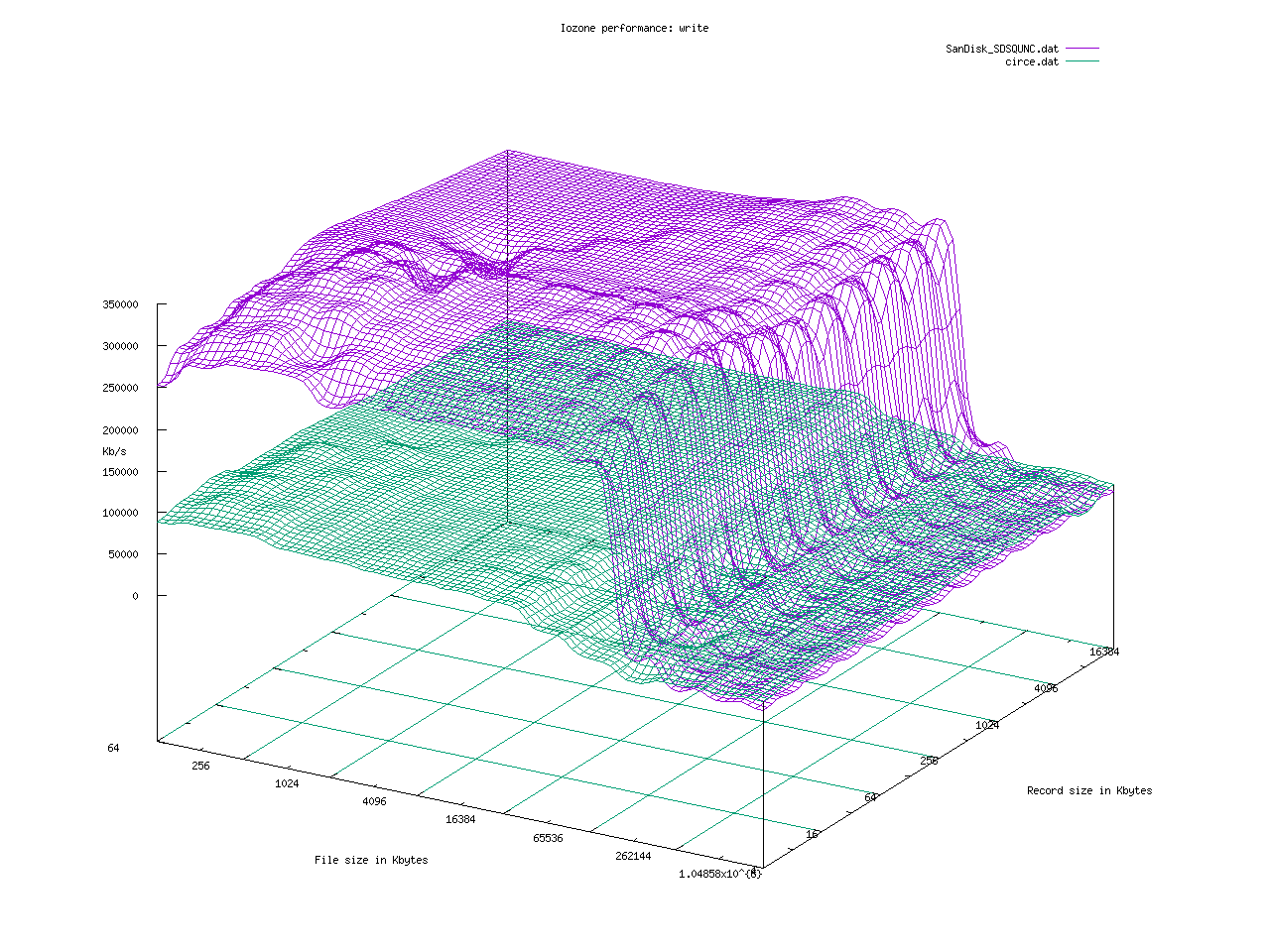
I can't really call a MicroSD or USB drive a disk, they are not spinning rust but nanometer feature sized flash cells. The RPI3 appears to either use the USB interface for the MicroSD drive or there is some other limit which makes the USB and MicroSD drives perform almost identically. The following graphs from iozone compare the SanDisk SDSQUNC 032G MicroSD card running Raspbian with a random 8GB PNY thumb drive I have on my keychain. I formatted the USB drive with EXT4, and the MicroSD was formatted by NOOBS with EXT4 when installing Raspbian.
Write performance is critical for recording. Average write of 300 Mb/s for most file sizes and record sizes will be quite adequate for stereo or 4 channel recording at 192k/s by 32 bit.
By way of comparison, here is the SanDisk/RPI3 combination against an aging Pentium III with UDMA 100 Maxtor drives. I have some antique systems to compare with, they recorded audio in their day as well.
Write performance is critical for recording. Average write of 300 Mb/s for most file sizes and record sizes will be quite adequate for stereo or 4 channel recording at 192k/s by 32 bit.
| MicroSD vs USB ext4 iozone write |
By way of comparison, here is the SanDisk/RPI3 combination against an aging Pentium III with UDMA 100 Maxtor drives. I have some antique systems to compare with, they recorded audio in their day as well.
 |
| RPi3 MicroSD vs Pentium III Maxtor UDMA 100 iozone write |
Subscribe to:
Posts (Atom)